


Every time a system is validated in a regulated environment, there’s a group of people behind the scenes making it happen. From drafting requirements to performing tests and writing reports, computer system validation relies on skilled professionals who know what they’re doing. That’s exactly why FDA auditors take a close look at CSV training records. They want proof that the people involved had the knowledge, experience, and preparation to complete the work correctly.
In this blog, we’ll explore what auditors expect to see in your CSV training records and why it matters so much. You’ll learn how to prepare documentation that reflects real qualifications, avoid common pitfalls, and build a record system that holds up under pressure. Whether your team is updating procedures or getting ready for an inspection, having your training records in good shape can make all the difference.
When auditors review CSV training records, they are looking for clarity, relevance, and a clear connection between the content delivered and the person’s role. It is not enough to show that someone sat through a session. What matters is that the training equipped them to perform validation work properly and confidently. A record that reflects this will contain real substance, not just signatures and checkboxes.
A good training record begins with the basics. It should name the course, explain what topics were covered, and link those topics to the tasks the individual is responsible for. For example, if someone is validating a clinical data system, the record should show that they were trained on writing functional requirements, documenting test results, and reviewing system changes. If the training included a practical component, that should be included too, along with any feedback they received.
Auditors often ask who provided the training and whether that person was qualified to deliver it. A strong record includes that information clearly, showing that the course was led by someone with appropriate knowledge and experience. It should also confirm whether the training was evaluated. If participants were quizzed or took part in a hands-on exercise, that detail helps demonstrate real learning.
Finally, everything needs to be documented in a consistent and organised format. If records are scattered or vague, it becomes difficult to prove that people know how to do their jobs. But when training records are thoughtful and well kept, it gives confidence not just to auditors, but also to the quality team and leadership.
Having clear and audit-ready CSV training records starts with practical, role-based learning. Our Computer System Validation (CSV) course is built for teams that work with regulated systems and need to show inspectors that they truly know their stuff. It walks your team through the GAMP 5 framework, shows exactly how validation phases work, and connects every step back to real-life responsibilities.
This course gives learners a full understanding of what CSV means in practice, including how to write requirements, manage traceability, and maintain electronic records that stand up to FDA or EU scrutiny. It’s all designed by qualified regulatory experts who know what auditors expect.
When you complete the CSV course, your team receives an accredited certificate that’s dated, traceable, and fully compliant. That’s peace of mind when the inspector asks for proof that your people have the right training.
What you can expect with our CSV training:
A focused, credible CSV training record shows you’re ready for any audit.
One of the first red flags auditors often encounter is training that looks polished on paper but lacks depth when put into context. For example, teams may have sat through a general CSV course, but when asked how it applies to their specific systems, they struggle to give clear answers. This disconnect shows that the training was not tailored or reinforced in a way that supported understanding. Simply having a certificate or signed attendance sheet is not enough to demonstrate readiness or comprehension during an audit.
Another common weakness lies in the timing and structure of the training itself. If someone receives training several weeks before the validation project even begins, auditors may question whether the knowledge is still relevant or fresh. Without documentation showing ongoing learning or practical application, that training record might come across as an afterthought rather than part of a structured validation plan. Auditors frequently look for evidence such as quizzes, notes, or role-specific examples that link training directly to the tasks the individual will be responsible for.
Storage and version control of training records is another critical area that often falls short. It is not uncommon to find CSV training records housed in folders that are accessible to anyone, where files can be changed, duplicated or even deleted without oversight. Auditors notice when there is no audit trail showing who reviewed the record, when it was approved, or whether the version used was current at the time of training. When documentation appears disorganised or lacks integrity, it raises concerns not only about training but about how the company handles data and compliance overall.
Some organisations also fail to create a clear connection between roles and the content of the training provided. A validation specialist should not be receiving the same materials as a project manager who only oversees system selection. Without that alignment, the training appears generic and lacks the targeted focus that modern regulatory bodies expect. Auditors want to see that everyone has been trained for their responsibilities, not just for the sake of compliance, but for the success and integrity of the validation effort as a whole.
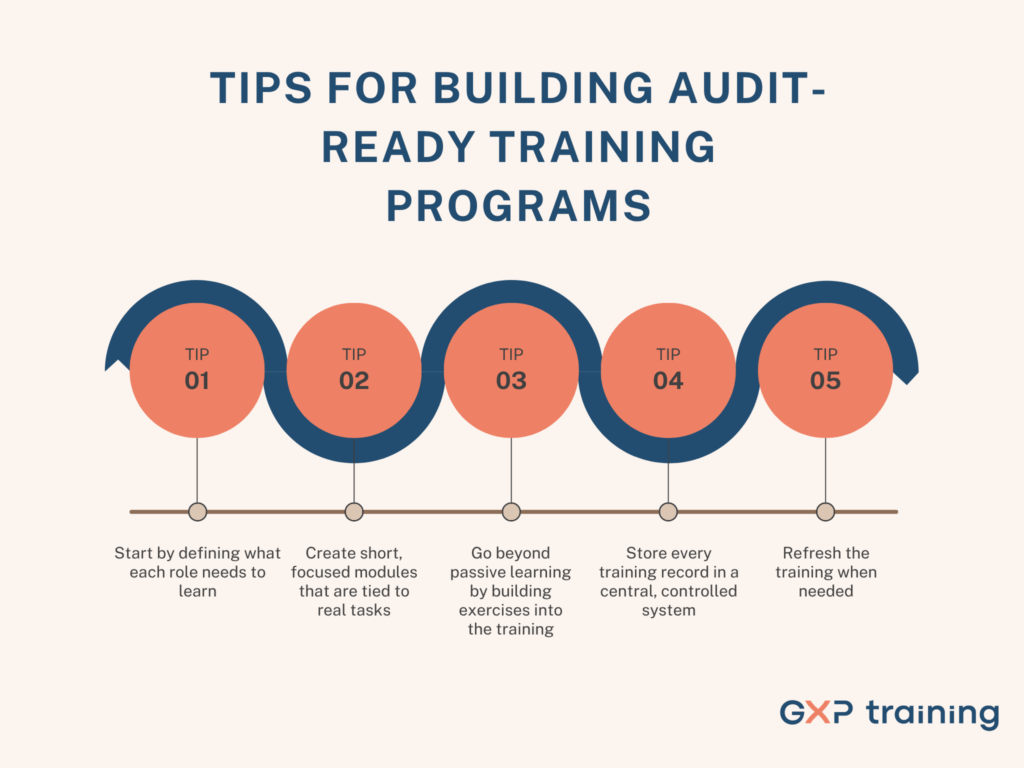
Here are some practical and proven steps to help create CSV training that earns respect from auditors and genuinely supports your team’s understanding.
These steps help you build a program that doesn’t just meet regulatory expectations, but genuinely supports staff in delivering high-quality work with confidence. A clear, role-based training structure also reduces stress and confusion during inspections because everyone understands what they learned, why it matters, and how it fits into their responsibilities.
Preparing for audits starts long before an auditor ever arrives. It begins with how your team is trained, how that training is documented, and whether it clearly reflects the actual responsibilities people hold. When training records are organised, specific, and role-based, auditors can easily trace how knowledge translates into execution. They are not just reviewing paperwork, they are assessing whether your team is capable of maintaining compliance in real time. Clean, accurate documentation sends a strong message that your systems are controlled and your processes are built on intention, not guesswork.
This kind of clarity also benefits your team. When people are given training that connects directly to their daily responsibilities, they learn faster and retain more. They understand why certain protocols exist and how to apply them with confidence. Instead of sitting through generic sessions that feel disconnected from their work, they become engaged learners who ask better questions and make fewer mistakes. This sense of preparedness shows during inspections and supports a culture of accountability long after the audit is over.
Our Computer System Validation (CSV) training course helps your team build clear, credible training records that hold up during an audit. It is practical, role-specific, and makes it easy to show inspectors your people have the skills they need.
If you want support updating your CSV program or making sure it works in real life, just reach out. We are ready to help you strengthen it step by step.